
Artificial Intelligence applications may look simple from the outside.
A user enters a prompt, uploads an image, asks a question, or submits some data—and within seconds, the application returns an intelligent response.
For example:
User → AI Application → AI Model → Response
But behind this simple interaction is often a sophisticated cloud architecture involving compute resources, AI models, APIs, databases, storage systems, networking, security, monitoring, and scaling mechanisms.
Understanding this architecture is becoming increasingly important for developers, software engineers, test automation engineers, DevOps professionals, data engineers, and anyone working with modern AI systems.
In this article, we will explore how cloud architecture for AI applications works, the major components involved, how data moves through the system, and the architectural decisions engineers need to consider when building scalable AI applications.
What Is Cloud Architecture?
Cloud architecture describes how different cloud technologies and services are organized and connected to build an application.
A traditional application might contain:
Frontend → Backend → Database
Modern cloud applications are usually more distributed.
They may contain:
-
Web and mobile applications
-
APIs
-
Load balancers
-
Containers
-
Serverless functions
-
Databases
-
Object storage
-
Caching systems
-
Message queues
-
Monitoring systems
-
Authentication services
AI introduces additional components.
An AI application may also require:
-
Large Language Models
-
Machine Learning models
-
GPUs
-
Vector databases
-
Embedding models
-
Model APIs
-
Prompt management
-
Retrieval systems
-
AI safety mechanisms
-
Model monitoring
Cloud architecture for AI applications is essentially the design of the infrastructure that allows all these components to work together reliably, securely, and efficiently.
Why AI Applications Need Different Architecture
Traditional applications mainly execute predefined business logic.
For example, an e-commerce application might process:
User Request → Application Logic → Database → Response
AI applications behave differently.
Consider an AI assistant that answers questions about company documents.
The architecture might look like:
User → Web Application → Backend API → Authentication → Document Retrieval → Embedding Search → LLM → Response
Several additional operations may happen behind the scenes.
The application may need to:
-
Understand the user’s request
-
Retrieve relevant information
-
Construct a prompt
-
Send the prompt to an AI model
-
Wait for model inference
-
Validate or filter the response
-
Return the answer to the user
-
Record usage, latency, errors, and cost
This makes AI architecture more complex than simply calling an API.
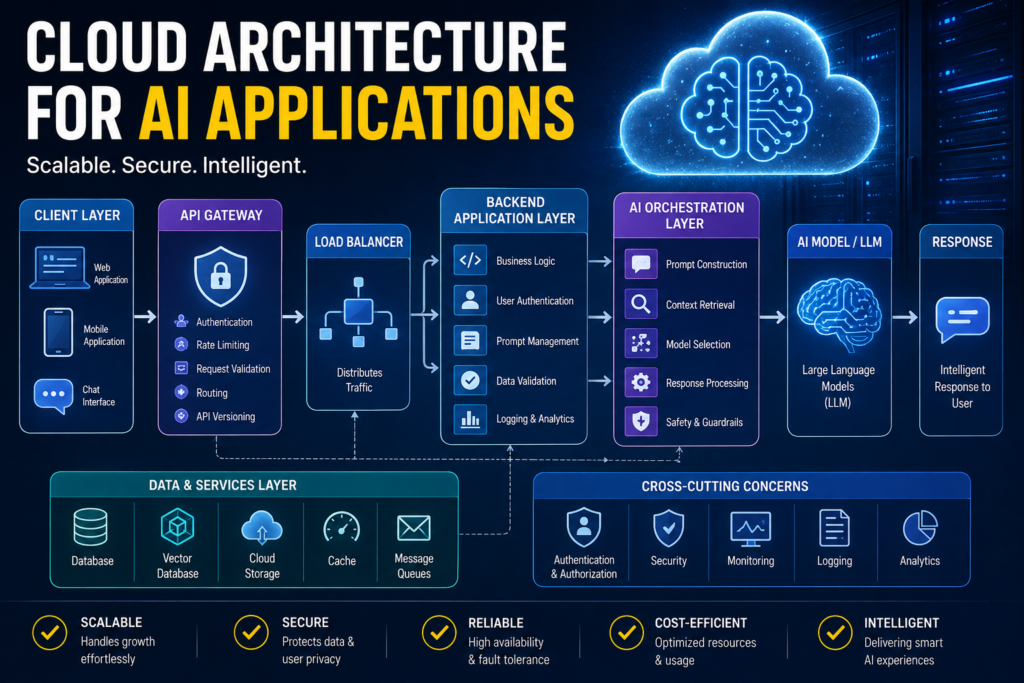
High-Level Cloud Architecture for an AI Application
A simplified architecture might look like this:
User
↓
Web / Mobile Application
↓
API Gateway / Load Balancer
↓
Backend Application
↓
AI Orchestration Layer
↓
AI Model / LLM
↓
Response
Additional systems may operate alongside this flow:
Database
Cloud Storage
Vector Database
Cache
Authentication
Monitoring
Logging
Security Services
Message Queues
Analytics
Together, these components form the cloud architecture supporting the AI application.
The Client Layer
The first component is usually the client application.
Examples include:
-
Web applications
-
Mobile applications
-
Desktop applications
-
Chat interfaces
-
Internal enterprise applications
-
Developer tools
The client is responsible for collecting user input.
For example:
“Summarize this document.”
The client may send the request to a backend API.
The client generally should not communicate directly with sensitive AI services using secret API keys.
Instead, communication normally flows through a secure backend.
A common architecture is:
User → Frontend → Backend API → AI Service
This allows the backend to control authentication, authorization, security, logging, usage limits, and AI access.
API Gateway
As applications grow, requests often enter the cloud environment through an API gateway or similar entry point.
The API gateway acts as the front door of the backend system.
It can perform tasks such as:
-
Request routing
-
Authentication
-
Rate limiting
-
Request validation
-
API versioning
-
Usage tracking
-
Security policy enforcement
For example:
User Request
↓
API Gateway
↓
AI Backend Service
If thousands of users access an AI application, the API gateway helps control how those requests enter the system.
Load Balancing
Imagine an AI application has 100 users.
One server might handle the workload.
Now imagine it has 100,000 users.
A single server may no longer be enough.
Cloud architectures therefore frequently use multiple application instances.
For example:
Users
↓
Load Balancer
↓
Application Instance A
Application Instance B
Application Instance C
Application Instance D
The load balancer distributes requests among available application instances.
This improves:
-
Scalability
-
Availability
-
Performance
-
Fault tolerance
If one application instance fails, traffic may be routed to healthy instances.
Backend Application Layer
The backend is where much of the application logic lives.
It might be developed using technologies such as:
-
Python
-
Java
-
JavaScript / Node.js
-
Go
-
.NET
The backend may perform operations such as:
-
User authentication
-
Input validation
-
Prompt construction
-
Database access
-
AI API calls
-
Retrieval
-
Business logic
-
Response formatting
-
Error handling
For example:
User Question
↓
Backend receives question
↓
Backend retrieves relevant information
↓
Backend constructs prompt
↓
Backend calls AI model
↓
Backend processes response
↓
Response returned to user
The backend acts as the bridge between the application and the AI infrastructure.
The AI Orchestration Layer
Modern AI applications frequently need more than a single model call.
An orchestration layer coordinates the different steps required to generate a useful response.
For example:
User Question
↓
Determine task
↓
Retrieve relevant information
↓
Create prompt
↓
Call model
↓
Validate response
↓
Return answer
More sophisticated systems may involve multiple models or tools.
For example:
User
↓
AI Orchestrator
↓
LLM
↙ ↓ ↘
Database | Search | External API
↓
Final Response
The orchestration layer determines which resources should be used and how information should be passed between them.
AI Model Layer
At the center of the architecture is usually an AI model.
Depending on the application, this could be:
-
Large Language Model
-
Computer Vision model
-
Speech recognition model
-
Recommendation model
-
Classification model
-
Forecasting model
-
Custom Machine Learning model
Organizations generally have two broad approaches.
Managed AI APIs
The application sends requests to an AI model hosted by a provider.
Architecture:
Application → AI API → Hosted Model
Advantages include:
-
Simple integration
-
No GPU infrastructure management
-
Easy scaling
-
Faster development
This approach is common when building Generative AI applications.
Self-Hosted Models
Organizations can also deploy models on their own cloud infrastructure.
Architecture:
Application → Model Server → GPU Infrastructure → Model
This provides greater control but also introduces additional responsibilities.
Teams may need to manage:
-
GPU instances
-
Model deployment
-
Scaling
-
Model serving
-
Updates
-
Monitoring
-
Security
-
Infrastructure cost
The right choice depends on requirements such as cost, privacy, latency, control, and scale.
Why GPUs Matter
Many AI workloads involve extremely large numbers of mathematical operations.
GPUs are designed to perform many computations in parallel, making them particularly useful for AI.
They are commonly used for model training and model inference.
Training large neural networks can require significant GPU resources.
Inference means running a trained model to generate a prediction or response.
For example:
Prompt → Model → Generated Response
Not every AI workload requires GPUs.
Smaller models or traditional Machine Learning models may run effectively on CPUs.
The infrastructure should therefore match the workload rather than automatically using expensive GPU resources.
Cloud Storage
AI applications frequently work with large amounts of data.
Examples include:
-
Documents
-
Images
-
Videos
-
Audio
-
Training datasets
-
Model files
-
Logs
-
Generated content
Object storage services are commonly used for this type of data.
Cloud storage provides benefits such as:
-
Large storage capacity
-
High durability
-
Easy integration
-
Access control
-
Backup capabilities
-
Lifecycle management
For example, an AI document analysis application might use:
User uploads PDF
↓
Cloud Object Storage
↓
Document Processing Service
↓
Embedding Model
↓
Vector Database
Databases in AI Architecture
AI applications still require traditional databases.
A relational or NoSQL database might store:
-
User accounts
-
Application settings
-
Conversation metadata
-
Permissions
-
Transactions
-
Usage information
-
Application configuration
For example:
User
↓
AI Application
↓
Database
The database might store the user’s preferences while the AI model handles natural-language interaction.
It is important to understand that an AI model does not replace a database.
They serve different purposes.
Vector Databases
Generative AI applications often introduce another type of storage system: a vector database or vector search system.
Vector databases store numerical representations called embeddings.
An embedding converts information such as text into a numerical representation.
Conceptually:
Text
↓
Embedding Model
↓
Vector
These vectors allow systems to search based on semantic similarity rather than only exact keywords.
This is especially useful in RAG-based AI systems.
Retrieval-Augmented Generation Architecture
One of the most common architectures for Generative AI applications is Retrieval-Augmented Generation, commonly called RAG.
RAG allows an LLM to answer questions using information retrieved from external sources.
Consider an organization with thousands of internal documents.
The user asks:
“What is our company’s leave policy?”
Instead of relying entirely on the LLM’s existing knowledge, the application retrieves relevant company documents.
The architecture might look like:
User Question
↓
Backend
↓
Embedding Model
↓
Vector Search
↓
Relevant Documents
↓
Prompt + Retrieved Context
↓
LLM
↓
Answer
This architecture allows organizations to build AI systems that work with private or domain-specific knowledge.
RAG Data Ingestion Pipeline
Before users can search documents, those documents must usually be processed.
A typical ingestion pipeline looks like:
Documents
↓
Cloud Storage
↓
Document Processing
↓
Text Extraction
↓
Chunking
↓
Embedding Generation
↓
Vector Database
Suppose an organization uploads a large manual.
The system might divide the document into smaller chunks.
Each chunk is converted into an embedding.
Those embeddings are stored in the vector database.
Later, when a user asks a question, the system searches for the chunks most closely related to the question.
Caching
AI model calls can be slower and more expensive than normal application operations.
Caching can therefore be extremely useful.
Suppose thousands of users ask:
“What are your support hours?”
Generating the same AI response repeatedly may be unnecessary.
The system may store frequently requested information in a cache.
Architecture:
User Request
↓
Check Cache
↙ ↘
Found Not Found
↓ ↓
Return Call AI
             ↓

         Store Result
Caching can help reduce:
-
Latency
-
AI API calls
-
Infrastructure usage
-
Cost
However, engineers must carefully decide what can safely be cached, especially when responses depend on user-specific or rapidly changing data.
Message Queues and Asynchronous Processing
Some AI operations take longer to complete.
For example:
-
Processing a large document
-
Generating embeddings
-
Analyzing thousands of images
-
Running batch predictions
-
Generating large reports
Keeping the user waiting for a single HTTP request may not be appropriate.
Instead, applications can use asynchronous architecture.
For example:
User Uploads Document
↓
Backend
↓
Message Queue
↓
AI Processing Worker
↓
Database / Storage
↓
Processing Complete
Message queues can also help distribute workloads across multiple workers.
Containers
Containers have become an important part of modern cloud architecture.
A container packages an application together with its dependencies.
For example:
Application Code + Runtime + Libraries + Configuration
can be packaged into a container image.
This allows the same application environment to run consistently across:
-
Developer computers
-
Testing environments
-
Staging
-
Production
AI applications may containerize:
-
Backend APIs
-
Model servers
-
Embedding services
-
Document processors
-
Background workers
Docker is commonly used for creating containers.
Kubernetes and AI Applications
When organizations operate many containers, they may use Kubernetes to manage them.
Kubernetes can help with:
-
Container deployment
-
Scaling
-
Service discovery
-
Health checks
-
Load balancing
-
Failure recovery
-
Rolling updates
For example:
Kubernetes Cluster
├── AI API Pods
├── Backend Pods
├── Embedding Service Pods
├── Document Processing Pods
└── Background Worker Pods
If demand increases, additional application instances can be created.
Kubernetes is particularly useful for complex AI platforms, although it can add operational complexity and is not necessary for every project.
Serverless Architecture
Not every AI application requires continuously running servers.
Cloud providers also offer serverless computing.
With serverless architecture, developers deploy functions or services while the cloud platform manages much of the underlying infrastructure.
Example:
User uploads document
↓
Cloud Storage Event
↓
Serverless Function
↓
Document Processing
↓
AI Service
This can be useful for event-driven workloads.
Advantages may include:
-
Automatic scaling
-
Reduced infrastructure management
-
Pay-for-usage pricing
However, serverless systems can have limitations involving execution duration, memory, startup latency, and specialized GPU workloads.
Authentication and Authorization
AI applications often process sensitive information.
Authentication verifies:
Who is the user?
Authorization determines:
What is the user allowed to access?
Consider an enterprise AI assistant.
One employee may have access to HR documents.
Another may have access to engineering documents.
Another may have access to financial documents.
The AI retrieval system must respect these permissions.
Otherwise, an AI assistant could accidentally expose information to unauthorized users.
Security therefore must be part of the architecture rather than something added after development.
Secrets and API Key Management
AI applications frequently interact with external services using API keys.
Examples include:
-
AI provider credentials
-
Database passwords
-
Cloud credentials
-
External API tokens
These secrets should not be hardcoded into source code or exposed in frontend applications.
Instead, production systems typically use secure secret-management mechanisms.
Architecture:
Application
↓
Secret Management Service
↓
Credential
↓
Authorized Service
This reduces the risk of credentials being exposed.
Networking
Cloud networking determines how different components communicate.
An AI system might contain:
Public Internet
↓
Load Balancer
↓
Private Application Network
↓
Backend Services
↓
Database / Model Services
Databases and internal services often do not need to be directly accessible from the public internet.
Network controls can restrict communication so that only authorized systems can access sensitive resources.
This reduces the application’s attack surface.
Monitoring and Observability
Once an AI application is running, engineers need to know what is happening inside it.
Monitoring may track:
-
CPU usage
-
GPU usage
-
Memory
-
API latency
-
Model latency
-
Request volume
-
Error rates
-
Token usage
-
AI API cost
-
Database performance
-
Cache performance
These metrics help teams understand both application performance and AI-related costs.
AI-Specific Observability
AI introduces monitoring requirements beyond traditional infrastructure metrics.
Teams may also monitor:
-
Prompt size
-
Output size
-
Retrieval quality
-
Hallucination rates
-
Model errors
-
Safety violations
-
Tool-call failures
-
User feedback
-
Token consumption
-
Model version
-
Response quality
This is particularly important because an AI system can technically return a successful response while still producing a poor or incorrect answer.
Traditional monitoring might say:
HTTP 200 — Success
But AI evaluation might say:
Response quality — Poor
Both perspectives matter.
Scaling AI Applications
Cloud applications must be able to respond to changing demand.
A system may start with only a few application instances and gradually scale as traffic increases.
This is known as horizontal scaling.
AI infrastructure can be more difficult to scale because GPU resources can be expensive and may have limited availability.
Architecture must therefore balance:
Performance + Availability + Cost
Cost Architecture for AI
Cost is one of the most important considerations when designing AI systems.
Traditional application costs may include:
-
Compute
-
Storage
-
Databases
-
Networking
AI introduces additional costs such as:
-
GPU usage
-
Model API requests
-
Input tokens
-
Output tokens
-
Embedding generation
-
Vector search
-
Model storage
Engineers can optimize costs using techniques such as:
-
Selecting appropriate models
-
Reducing unnecessary prompt size
-
Caching
-
Batching
-
Using smaller models for simpler tasks
-
Autoscaling
-
Shutting down unused GPU resources
-
Monitoring token usage
-
Optimizing retrieval
A powerful model should not automatically be used for every task.
Using Multiple AI Models
Modern AI architectures can use multiple models.
For example:
User Request
↓
AI Router
↙ ↓ ↘
Small Model | Large Model | Specialized Model
A simple classification task might use a smaller and less expensive model.
A complex reasoning task might use a more capable model.
An image request might use a vision model.
This approach can improve both performance and cost efficiency.
Resilience and Failure Handling
AI systems depend on many services.
Any of them can fail.
Examples include:
-
AI provider unavailable
-
Database unavailable
-
Vector database timeout
-
GPU server overloaded
-
Network failure
-
Rate limit exceeded
Applications therefore need failure-handling strategies.
These may include:
-
Retries
-
Timeouts
-
Circuit breakers
-
Fallback models
-
Queues
-
Graceful degradation
Critical systems should always consider what happens when an AI dependency becomes unavailable.
A Complete Example: Enterprise AI Assistant
Imagine a company wants to build an internal AI assistant that answers employee questions based on company documents.
The architecture might look like:
Employee
↓
Web Application
↓
API Gateway
↓
Authentication
↓
Load Balancer
↓
Backend Service
↓
AI Orchestrator
↓
Embedding Service
↓
Vector Database
↓
Relevant Company Documents
↓
Prompt Construction
↓
LLM
↓
Response Validation
↓
Employee
At the same time:
Cloud Storage stores documents.
Traditional Database stores user and application information.
Cache stores reusable results.
Monitoring System tracks performance.
Logging System records technical events.
Secret Manager protects credentials.
Security Services enforce access policies.
Autoscaling adjusts infrastructure based on demand.
This is a much more realistic picture of an enterprise AI application than simply:
User → Chatbot → AI
Cloud Architecture Across AWS, Azure, and Google Cloud
The architectural concepts discussed above exist across the major cloud platforms.
The exact product names differ, but the concepts remain similar.
All major cloud providers offer services for:
-
Compute
-
Virtual machines
-
Containers
-
Kubernetes
-
Serverless computing
-
Object storage
-
Databases
-
Networking
-
Identity management
-
Monitoring
-
Machine Learning
-
Generative AI
Students should therefore first understand concepts such as:
Compute → Storage → Networking → Database → Containers → Serverless → AI Services
before focusing heavily on individual service names.
Cloud products change over time.
Architecture principles are more durable.
Managed AI vs Self-Hosted AI Architecture
One important architectural decision is whether an organization should use managed AI services or host models itself.
Managed AI
Application → Provider API → AI Model
Useful when teams want:
-
Faster development
-
Less infrastructure management
-
Easy access to advanced models
-
Managed scalability
Self-Hosted AI
Application → Internal Model API → GPU Infrastructure → Model
Useful when organizations need greater control over:
-
Infrastructure
-
Model deployment
-
Data handling
-
Custom models
-
Performance tuning
There is no universally correct choice.
Many organizations use a hybrid approach.
Cloud AI vs Local AI vs Edge AI
Not every AI application must run entirely in the cloud.
There are several deployment possibilities.
Cloud AI
Models run in cloud infrastructure.
Useful for:
-
Large-scale applications
-
Powerful models
-
Centralized management
-
Rapid scaling
Local AI
Models run on local computers or internal infrastructure.
Useful when:
-
Data privacy is important
-
Internet connectivity is limited
-
Organizations want infrastructure control
Edge AI
Models run near the source of the data.
Examples include:
-
Cameras
-
Vehicles
-
Industrial devices
-
Smartphones
-
IoT devices
Edge AI can reduce latency and dependency on cloud connectivity.
Modern architectures may combine all three.
Hybrid AI Architecture
A hybrid architecture may look like:
User Device
↓
Local Small AI Model
↓
Complex Request?
↙ ↘
No Yes
↓ ↓
Local Response Cloud AI Model
This allows simple operations to run locally while more demanding tasks use cloud infrastructure.
Hybrid architectures can improve privacy, cost, latency, and reliability, although they also introduce additional complexity.
Designing an AI Architecture: Key Questions
Before building an AI application, engineers should ask important questions.
What problem are we solving?
Do we actually need AI?
Which model is appropriate?
Should we use a hosted API or self-hosted model?
Where will data be stored?
Do we need object storage, a traditional database, a vector database, or all three?
Does the application need RAG?
Does the model need access to private or current information?
How many users will access the system?
What are the latency requirements?
What happens when the AI service fails?
What data is sensitive?
How will access be controlled?
How will AI cost be monitored?
These questions should be answered during architecture design rather than after deployment.
Common Mistakes When Designing AI Cloud Architecture
Beginners often focus entirely on the model.
However, the AI model is only one component of the system.
A production AI application also requires:
Infrastructure + Data + Security + APIs + Monitoring + Deployment
Other common mistakes include exposing API keys, ignoring cost, using the largest model for every task, ignoring failure scenarios, and failing to enforce data permissions.
Another common mistake is adding too much architectural complexity too early.
A small AI application does not necessarily need Kubernetes, dozens of microservices, multiple databases, and a complicated distributed architecture.
The best approach is usually to start with the simplest architecture that satisfies the requirements and evolve it as the system grows.
How AI Architecture Evolves
An AI system often starts with a simple prototype.
Frontend → Backend → AI API
Later, the application may add:
Database + Cloud Storage
When private knowledge is required, it may add:
Embedding Model + Vector Database + RAG
When the application moves toward production, it may add:
Authentication + API Gateway + Monitoring + Logging + Secret Management
As usage grows, it may add:
Load Balancing + Autoscaling + Caching + Message Queues
Advanced platforms may eventually add:
Multiple Models + Model Routing + Evaluation + Guardrails + Advanced Observability
The important lesson is:
Architecture should evolve with requirements.
Skills Engineers Need for Cloud AI Architecture
Building modern AI applications requires knowledge beyond Machine Learning.
Engineers increasingly benefit from understanding cloud fundamentals such as compute, storage, networking, databases, and identity management.
They also need software engineering knowledge, including APIs, backend development, error handling, and distributed systems.
DevOps knowledge is also valuable, including Docker, Kubernetes, CI/CD, and infrastructure automation.
For AI engineering, important concepts include:
-
LLM APIs
-
Embeddings
-
Vector databases
-
RAG
-
Prompt engineering
-
Model evaluation
Security knowledge is also essential, especially authentication, authorization, secret management, and data protection.
Monitoring, logging, metrics, tracing, and AI evaluation are also becoming increasingly important.
The Bigger Picture
When users interact with an AI application, they may see something extremely simple:
Prompt → Response
But the real architecture may look more like:
User
↓
Frontend
↓
API Gateway
↓
Load Balancer
↓
Backend
↓
Authentication
↓
AI Orchestrator
↙ ↓ ↘
Database | Vector Search | External APIs
↓
AI Model
↓
Guardrails / Validation
↓
Response
Meanwhile:
Cloud Storage + Cache + Queues + Monitoring + Logging + Security + Autoscaling
operate behind the scenes.
This is the infrastructure that turns an AI model into a real production application.
Cloud architecture is one of the most important foundations for understanding how modern AI applications work.
An AI model alone does not create a production AI system.
A complete application may require:
AI Models + Compute + APIs + Data + Storage + Databases + Networking + Security + Monitoring + Scaling + Deployment
Understanding how these components interact allows engineers to move beyond simply experimenting with AI APIs and begin thinking like AI application architects.
The most important lesson is not to memorize every cloud service.
Instead, understand the architectural concepts.
Learn why applications need compute.
Understand where data lives.
Understand how services communicate.
Understand how applications scale.
Understand how security protects information.
Understand how AI models integrate into the larger system.
Once these fundamentals are clear, technologies from AWS, Microsoft Azure, Google Cloud, or other cloud platforms become much easier to understand.
The AI model may provide the intelligence—but cloud architecture provides the infrastructure that makes that intelligence usable, scalable, secure, and reliable.
Happy Learning!