
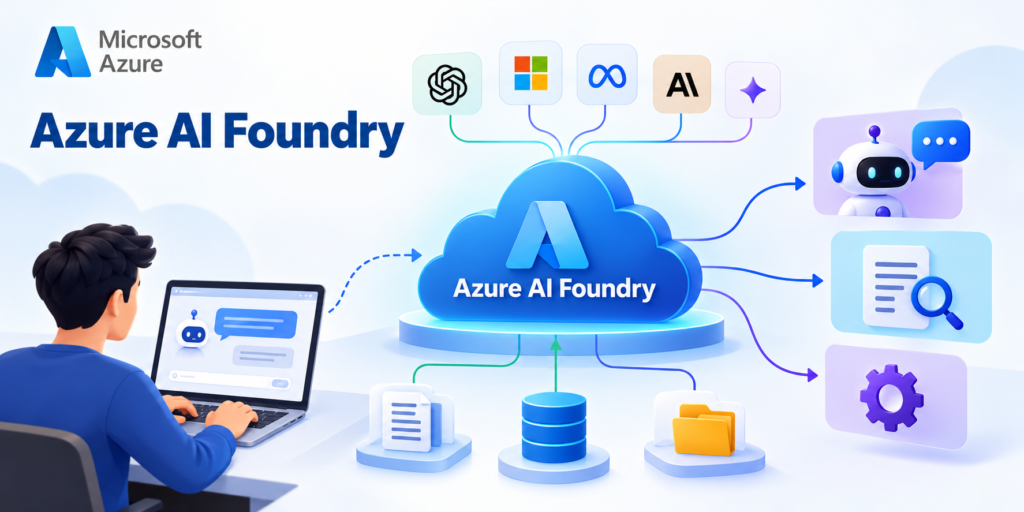
Introduction to Azure AI Foundry
Artificial Intelligence (AI) is transforming the way organizations develop software, automate business processes, analyze information, and interact with customers.
Today, AI-powered applications are used in customer support, healthcare, education, finance, software development, and many other industries.
However, building an AI application requires more than simply selecting an AI model.
Developers must consider several important questions:
Which AI model should be used?
How can the model be integrated into an application?
How can AI applications access company documents and databases?
How can developers evaluate the accuracy and reliability of AI-generated responses?
How can AI applications be deployed securely?
How can organizations monitor performance, usage, and costs?
Microsoft provides a platform designed to address these challenges: Azure AI Foundry, now known as Microsoft Foundry.
It brings together AI models, development tools, agent-building capabilities, evaluation, monitoring, and enterprise security features.
In this article, we will explore Azure AI Foundry, its important components, architecture, working process, real-world applications, and how students can get started with the platform.
What Is Azure AI Foundry?
Azure AI Foundry is Microsoft’s unified platform for developing, customizing, evaluating, deploying, and managing AI-powered applications and intelligent agents.
It provides a centralized environment where developers, data scientists, and AI engineers can work with AI models and build applications using Generative AI.
Instead of configuring every part of an AI application independently, developers can use Foundry to manage several important stages of AI development.
These include:
Discovering and selecting AI models
Deploying supported models
Developing AI-powered applications
Creating intelligent AI agents
Connecting applications to external information
Evaluating AI-generated responses
Monitoring application performance
Managing security and access
Controlling AI resource usage and costs
Important Update: Azure AI Foundry has evolved into Microsoft Foundry. Students may still encounter the earlier names Azure AI Studio and Azure AI Foundry in tutorials and documentation.
Microsoft Foundry is the current platform name, while the underlying goal remains to simplify enterprise AI application development.
Why Do We Need Azure AI Foundry?
Traditional software applications follow predefined programming instructions.
For example, a banking application retrieves account information from a database and displays it to the user.
Generative AI applications work differently.
They can understand natural language, interpret user questions, retrieve information, generate responses, and interact with external tools.
However, developing such applications introduces additional challenges.
Choosing the Right AI Model
Different AI models are designed for different tasks.
Some models specialize in text generation, while others support reasoning, image understanding, speech processing, or semantic search.
Developers must select models based on their application requirements, performance expectations, and budget.
Integrating Business Data
AI applications frequently need access to company-specific information.
For example, an employee support assistant may need access to HR policies, leave rules, and reimbursement documents.
The application must retrieve the correct information while respecting user permissions.
Evaluating AI Responses
AI models can generate incorrect or misleading responses.
Developers must evaluate whether responses are accurate, relevant, safe, and grounded in reliable information.
Managing Security
Enterprise AI applications may process sensitive business information.
Organizations need authentication, authorization, data protection, and access management.
Monitoring Applications
Once deployed, AI applications must be monitored for response quality, performance, reliability, and operational costs.
Azure AI Foundry helps developers manage these requirements through an integrated platform.
Key Components of Azure AI Foundry
Azure AI Foundry contains several important components that support the development and operation of AI applications.
Foundry Models
Foundry Models provides access to a catalog of AI models from different providers.
Depending on availability, deployment support, and licensing, developers can explore models from providers such as OpenAI, Microsoft, Meta, Anthropic, and others.
Different categories of models are useful for different applications.
Text Generation Models
These models generate human-like text based on user instructions.
Common applications include:
Chatbots
Content generation
Email drafting
Document summarization
Question-answering systems
Reasoning Models
These models are designed to handle tasks requiring more complex reasoning and problem-solving.
Examples include:
Technical problem solving
Analytical assistants
Complex question answering
Multistep reasoning tasks
Embedding Models
Embedding models convert text or other supported information into numerical representations called vectors.
These vectors help applications identify similarities between different pieces of information.
Embedding models are commonly used in:
Semantic search
Document retrieval
Recommendation systems
Retrieval-Augmented Generation (RAG)
Multimodal Models
Multimodal models can process more than one type of input, depending on their capabilities.
For example, a model may support text and image inputs.
Applications include:
Image understanding
Visual question answering
Document interpretation
Multimedia analysis
Why Is Model Selection Important?
Different models have different capabilities, response times, context-window limits, and costs.
A small model may be sufficient for a basic classification task, while a more capable model may be required for complex reasoning.
Choosing the appropriate model helps developers balance application quality, speed, and cost.
Foundry Agent Service
Foundry Agent Service is an important component for developing AI agents.
An AI agent is an application that combines an AI model with instructions, tools, and other capabilities to perform tasks.
A traditional chatbot generally focuses on answering questions.
An AI agent can be designed to perform more complex workflows involving external systems.
For example, consider an AI travel assistant.
A basic chatbot may answer:
“What are some popular tourist attractions in London?”
An AI agent could potentially:
Understand the traveler’s requirements
Search relevant travel information
Retrieve hotel information
Compare available options
Prepare a travel itinerary
Interact with authorized external tools
The actual capabilities depend on the tools and permissions configured for the agent.
Benefits of AI Agents
AI agents can help organizations automate workflows that involve multiple steps.
Examples include:
Customer support automation
IT helpdesk assistance
Business information retrieval
Document analysis
Research assistance
Software development support
Foundry Agent Service provides managed capabilities for developing, hosting, and operating supported agent applications.
Foundry Tools
Foundry Tools brings together AI capabilities for common application requirements.
These include services for language processing, document understanding, speech, and computer vision.
Document Intelligence
Document Intelligence helps applications extract information from documents.
Examples include:
Invoices
Receipts
Application forms
Financial documents
Business contracts
For example, an accounting application could use Document Intelligence to extract invoice numbers, dates, and amounts.
Speech
Speech capabilities support applications involving spoken language.
Examples include:
Speech-to-text conversion
Text-to-speech generation
Voice-enabled applications
Audio transcription
Vision
Vision capabilities help applications analyze images and other supported visual information.
Examples include:
Image analysis
Visual content understanding
Image-based information extraction
Language Processing
Language capabilities support tasks involving natural language.
Examples include:
Text classification
Sentiment analysis
Language detection
Entity recognition
These capabilities can be combined with generative AI models to develop more sophisticated applications.
Foundry Resources and Projects
Microsoft Foundry uses resources and projects to organize AI development.
A Foundry resource provides the Azure-level foundation for managing supported AI capabilities.
A Foundry project provides a workspace where developers can organize AI application development.
For example, a university might create separate projects for:
Student Support Assistant
Research Assistant
Admissions Information Assistant
Administrative Knowledge Assistant
Projects help teams organize their work and manage access to the resources they need.
The newer Foundry architecture emphasizes Foundry resources and projects rather than the older hub-based structure used in some previous Azure AI Foundry tutorials.
Understanding Azure AI Foundry Architecture
A typical AI application built using Azure AI Foundry contains several important layers.
Application Layer
This is the interface through which users interact with the AI application.
Examples include:
Websites
Mobile applications
Chat interfaces
Customer support portals
Internal enterprise applications
The application receives user requests and displays generated responses.
AI Platform Layer
This layer contains the AI models, agents, tools, and orchestration logic.
It is responsible for processing requests and coordinating the required AI capabilities.
For example, an AI application may use a language model to interpret a question and an external search tool to retrieve relevant information.
Data Layer
The data layer contains information used by the AI application.
Examples include:
PDF documents
Company knowledge bases
Databases
Product catalogs
Internal policies
Search indexes
AI applications can retrieve relevant information from these sources when appropriate integrations are configured.
Infrastructure Layer
The infrastructure layer provides the cloud services needed to operate the application.
Examples include:
Application hosting
Storage
Networking
Authentication
Monitoring
Supporting Azure services
Security and Governance Layer
Security and governance apply across the application.
Organizations must control access, protect sensitive information, monitor activity, and follow applicable compliance requirements.
Important: Not every AI application requires all these components. A simple text-generation application may need only a deployed model and an application that calls its API.
How Azure AI Foundry Works
Let us understand the working process through a practical example.
Imagine a company wants to develop an AI-powered employee helpdesk.
Employees frequently ask questions about company policies, leave balances, reimbursement procedures, and employee benefits.
Instead of manually searching through multiple documents, employees can ask questions in natural language.
The application can work as follows.
User Submits a Question
An employee asks:
“How many annual leave days am I eligible for?”
Application Receives the Request
The application receives the question and sends it to the AI backend.
Relevant Information Is Retrieved
A retrieval system searches authorized HR policy documents and identifies relevant information.
AI Model Processes the Information
The AI model receives the question along with the retrieved information.
It uses the supplied context to generate a response.
Application Displays the Answer
The employee receives an answer based on the retrieved policy information.
Where possible, the application should also provide references to the source documents.
System Monitoring
Developers monitor application performance, response quality, errors, and usage.
This example demonstrates how AI models, enterprise data, and application logic work together.
Retrieval-Augmented Generation (RAG) in Azure AI Foundry
Retrieval-Augmented Generation, commonly known as RAG, is an important technique used in enterprise AI applications.
A general-purpose language model may not know the latest internal information about an organization.
For example, an AI model may not know a company’s updated refund policy or employee leave rules.
RAG helps address this limitation by retrieving relevant information from external sources and providing it to the AI model.
How RAG Works
The RAG process generally involves the following steps.
User Question
A user asks:
“What is our company’s refund policy?”
Information Retrieval
The application searches an indexed collection of company documents.
Relevant Content Selection
The retrieval system identifies information related to the refund policy.
AI Model Processing
The selected information is supplied to the AI model as additional context.
Response Generation
The model generates a response using the retrieved information and its instructions.
Benefits of RAG
RAG provides several advantages.
It allows AI applications to use organization-specific information.
It reduces the need to retrain models whenever documents change.
It supports more relevant responses.
It can provide references to supporting documents.
It helps developers build knowledge-based assistants.
However, RAG does not guarantee that every response will be correct.
Developers must still evaluate retrieval accuracy, information quality, permissions, and generated answers.
Azure AI Search is one service that can support retrieval and semantic search in RAG applications.
Azure AI Foundry vs Azure OpenAI Service
Students often confuse Azure AI Foundry with Azure OpenAI Service.
Although closely related, they serve different purposes.
Azure OpenAI Service
Azure OpenAI provides access to supported OpenAI models through Azure.
Developers can use these models to build applications involving:
Text generation
Summarization
Question answering
Reasoning
Embeddings
Multimodal AI capabilities
The supported features depend on the selected model and deployment.
Microsoft Foundry
Microsoft Foundry provides a broader environment for AI application development.
It supports:
Models from multiple providers
AI agent development
Model deployment
AI tools
Evaluation
Monitoring
Enterprise management
Key Difference
Azure OpenAI focuses on providing OpenAI model capabilities through Azure.
Microsoft Foundry brings together a wider set of tools and services for developing and operating AI applications.
Microsoft also provides ways for existing Azure OpenAI users to adopt the unified Foundry resource model.
Azure AI Foundry vs Azure Machine Learning
Azure Machine Learning and Microsoft Foundry are related but have different areas of emphasis.
Azure Machine Learning
Azure Machine Learning focuses on the machine learning lifecycle.
Common capabilities include:
Preparing datasets
Training machine learning models
Running experiments
Managing model versions
Deploying trained models
Monitoring machine learning workloads
It is widely used for traditional machine learning and custom model development.
Microsoft Foundry
Microsoft Foundry focuses strongly on developing AI applications and agents using foundation models and supporting tools.
Common capabilities include:
Discovering pretrained models
Deploying supported AI models
Developing generative AI applications
Building AI agents
Integrating external knowledge
Evaluating model responses
Monitoring AI applications
Which One Should Students Learn?
Students interested in data science, predictive analytics, and custom model training should explore Azure Machine Learning.
Students interested in Generative AI, LLM applications, RAG, and AI agents should explore Microsoft Foundry.
Both platforms can be valuable for AI engineers.
How to Get Started With Azure AI Foundry
Students can begin exploring Microsoft Foundry through the web portal.
Create an Azure Account
You need an Azure account with an active subscription and appropriate permissions.
Visit:
https://azure.microsoft.com/free/
Microsoft provides information about available account options and credits.
Some AI services incur charges, so review pricing before creating resources.
Open the Microsoft Foundry Portal
Visit:
Sign in using your Azure account.
The portal provides access to supported AI models, projects, agents, and development tools.
Create a Foundry Resource and Project
Create or select a Foundry resource and set up a project.
Depending on the configuration, you may need to select:
Azure subscription
Resource group
Resource name
Supported Azure region
Project name
For example, you could create a project named:
student-ai-assistant
Explore AI Models
Open the model catalog and explore available models.
Review important characteristics such as:
Model capabilities
Supported input types
Context window
Deployment options
Regional availability
Pricing
Select a suitable model for your learning exercise.
Deploy the Model
Create a deployment using the available deployment workflow.
A deployment makes the selected model accessible for supported inference requests.
Test the Model
Use the available model testing interface or playground.
Try a prompt such as:
“Explain cloud computing to a beginner using a real-world example.”
Observe the generated response.
Then modify the prompt:
“Explain cloud computing to a beginner using a real-world example in less than 100 words.”
Compare the results.
This exercise demonstrates how instructions can influence AI-generated output.
Create a Basic AI Agent
After testing a model, explore Foundry Agent Service.
Create an agent with instructions such as:
“You are an educational assistant helping students learn cloud computing and artificial intelligence. Explain technical concepts using simple language, practical examples, and clear definitions.”
Test the agent using different questions.
Later, you can explore adding tools and knowledge sources.
Evaluate the Results
Review the generated responses.
Check whether they are:
Accurate
Relevant
Easy to understand
Consistent with instructions
Appropriate for the intended audience
Monitor Usage and Cost
Review usage information and Azure billing.
Delete unnecessary resources after completing your experiments to avoid unexpected charges.
Using Python With Microsoft Foundry
Developers can integrate Foundry model deployments into Python applications using supported APIs and SDKs.
For compatible OpenAI-style endpoints, a simplified example looks like this:
import os
from openai import OpenAI

client = OpenAI(
    base_url=os.environ["FOUNDRY_BASE_URL"],
    api_key=os.environ["FOUNDRY_API_KEY"]
)

response = client.responses.create(
    model=os.environ["FOUNDRY_DEPLOYMENT_NAME"],
    input="Explain artificial intelligence to a beginner."
)

print(response.output_text)
In this example:
The base URL identifies the compatible model API endpoint.
The API key provides authentication.
The deployment name identifies the model deployment.
The application sends a prompt to the model.
The model generates a response.
The exact endpoint, authentication method, and supported API depend on the deployment configuration.
For production applications, developers should use secure credential management, proper access controls, error handling, and monitoring.
Real-World Applications of Azure AI Foundry
Azure AI Foundry can support AI-powered solutions across different industries.
Education
Educational institutions can develop AI assistants that help students find course information, understand technical concepts, and access learning resources.
For example, an online learning platform could develop an assistant that answers questions about programming courses.
Customer Support
Businesses can develop AI-powered customer support assistants.
These applications can help users:
Find product information
Understand return policies
Troubleshoot common problems
Locate relevant support documentation
Healthcare Administration
Healthcare organizations can develop AI applications for authorized administrative document processing, information retrieval, and workflow assistance.
Such applications require appropriate privacy, security, and safety controls.
Finance
Financial organizations can use AI for document summarization, knowledge retrieval, and employee research assistance.
Applications involving sensitive financial information require appropriate governance and human oversight.
Software Development
Software development teams can use AI applications for:
Code explanations
Documentation generation
Debugging assistance
Requirements analysis
Technical knowledge retrieval
Software Testing and Test Automation
AI-powered testing assistants can help software testers with:
Generating test-case ideas
Understanding software requirements
Creating API test scenarios
Analyzing application logs
Summarizing test results
Explaining automation scripts
For example, a testing team could build an assistant that reads API specifications and suggests possible positive, negative, and boundary test scenarios.
Human review remains important because AI-generated tests may miss requirements or contain incorrect assumptions.
Security and Responsible AI in Azure AI Foundry
Security is an essential part of enterprise AI development.
Organizations must ensure that AI applications handle information responsibly.
Identity and Access Management
Microsoft Entra ID and Azure role-based access control help organizations manage access to resources.
Data Protection
Applications should protect sensitive information and prevent unauthorized access.
For RAG applications, retrieval permissions should be enforced so users cannot access documents beyond their authorization.
Content Safety
Content safety mechanisms can help identify or mitigate harmful content.
However, safety filters are not perfect and should be combined with appropriate application-level safeguards.
Monitoring and Auditing
Monitoring helps developers investigate errors, analyze system behavior, and identify operational issues.
Responsible AI Practices
Developers should consider:
Fairness
Reliability
Transparency
Privacy
Security
Accountability
Human oversight
Responsible AI practices are especially important in applications involving healthcare, employment, finance, or other consequential decisions.
Advantages of Azure AI Foundry
Azure AI Foundry offers several benefits for developers and organizations.
Unified AI Development Environment
Developers can work with AI models, agents, tools, and operational capabilities through a coordinated platform.
Access to Multiple AI Models
The platform supports models from different providers, allowing developers to evaluate alternatives.
Faster AI Application Development
Integrated development capabilities can simplify experimentation and prototyping.
Enterprise Integration
Applications can connect to Azure infrastructure, data services, and identity systems.
Evaluation and Monitoring
Evaluation and monitoring tools help developers assess application quality and performance.
Scalability
Supported Azure deployment options allow applications to serve workloads of different sizes, subject to service limits and available capacity.
Security and Governance
Azure security and management capabilities help organizations control access and manage AI resources.
Limitations and Challenges
Although Azure AI Foundry provides many benefits, developers should understand its limitations.
Cost Management
AI applications may incur charges for model inference, hosting, storage, retrieval, and monitoring.
AI Hallucinations
Generative AI models can produce incorrect or fabricated information.
Developers must evaluate responses and implement suitable safeguards.
Technical Complexity
Building production-ready AI applications still requires knowledge of APIs, cloud services, authentication, data integration, and application development.
Service Dependencies
Applications may depend on specific Azure services, supported regions, model providers, and APIs.
Rapidly Changing Technology
AI platforms evolve quickly.
Models, SDKs, deployment options, and portal interfaces may change over time.
Students should regularly review official documentation.
Best Practices for Students and Developers
When learning Azure AI Foundry, follow these recommendations.
Begin with simple AI applications before building complex agents.
Understand the basics of Large Language Models.
Learn prompt engineering.
Explore embeddings and semantic search.
Understand Retrieval-Augmented Generation.
Evaluate AI-generated responses.
Use secure authentication methods.
Avoid exposing API keys in source code.
Monitor model usage and costs.
Test applications with realistic scenarios.
Follow responsible AI principles.
Refer to current Microsoft documentation.
Students should focus on understanding how the different components work together rather than memorizing every feature.
Microsoft Learn: Official Learning Resources
Microsoft Learn provides official documentation, tutorials, and learning resources for Azure AI and Microsoft Foundry.
These resources are useful for students who want to gain practical experience.
Microsoft Foundry Overview
Learn about the platform, its architecture, and its capabilities.
https://learn.microsoft.com/en-us/azure/foundry/what-is-foundry
Microsoft Foundry Documentation
Explore models, agents, development tools, evaluation, deployment, and security.
https://learn.microsoft.com/en-us/azure/foundry/
Microsoft Learn Training
Explore free training resources and search for Microsoft Foundry learning paths.
https://learn.microsoft.com/en-us/training/
Create Foundry Resources
Follow Microsoft’s official quickstart for creating Foundry resources and projects.
https://learn.microsoft.com/en-us/azure/foundry/tutorials/quickstart-create-foundry-resources
Microsoft Azure AI Services
Explore Azure AI services and related technologies.
https://learn.microsoft.com/en-us/azure/ai-services/
Recommendation for Students
Start with the Microsoft Foundry overview, explore the model catalog, create a simple project, and experiment with a supported AI model.
After gaining confidence, move toward building AI agents and Retrieval-Augmented Generation applications.
Frequently Asked Questions
Is Azure AI Foundry Free?
Microsoft Foundry provides access to development tools and documentation, but using AI models and supporting Azure services may incur charges.
Costs depend on the selected services, deployment options, and usage.
Do I Need Programming Knowledge to Use Azure AI Foundry?
Beginners can explore certain capabilities through the portal without extensive programming knowledge.
However, Python, APIs, and cloud development skills are useful for building customized applications.
Is Azure AI Foundry Only for OpenAI Models?
No. Microsoft Foundry supports models from multiple providers, subject to availability and deployment requirements.
Can Azure AI Foundry Be Used to Build Chatbots?
Yes. Developers can use the platform to build chatbots, knowledge assistants, and AI agents.
Can I Connect My Own Documents to an AI Application?
Yes. Developers can use supported knowledge integrations and retrieval services to connect applications with external information.
Does Azure AI Foundry Automatically Train AI Models?
No. The platform provides access to pretrained models and supported customization capabilities.
Many generative AI applications can be built without training a foundation model from scratch.
Is Azure AI Foundry Useful for Software Testers?
Yes. Software testers can explore AI-assisted test-case generation, requirements analysis, API testing assistance, and test documentation.
What Is the Difference Between Azure AI Foundry and Microsoft Foundry?
Microsoft Foundry is the current name of the platform previously known as Azure AI Foundry.
The platform has also evolved in its architecture, tools, and agent development capabilities.
Azure AI Foundry, now known as Microsoft Foundry, is an important platform for developing modern AI-powered applications.
It brings together AI models, agent development, tools, evaluation, monitoring, and enterprise management capabilities.
For students learning Artificial Intelligence, Machine Learning, Generative AI, and cloud computing, understanding Microsoft Foundry provides valuable exposure to real-world AI engineering.
The key concepts to remember are:
AI models provide the underlying intelligence.
AI agents combine models with instructions and tools.
Retrieval-Augmented Generation connects AI applications with external knowledge.
Evaluation helps assess response quality and reliability.
Security protects applications and sensitive information.
Monitoring supports reliable application operation.
Cloud infrastructure provides the foundation for scalable AI applications.
As organizations increasingly adopt Generative AI and intelligent agents, the ability to integrate AI models with applications, data, and tools is becoming an important technical skill.
Learning Azure AI Foundry is a useful step toward becoming a skilled cloud AI developer or AI engineer.